

How a Local Service Business Can Automate Its First Workflow in 30 Days
If you run an HVAC company, cleaning business, landscaping firm, electrical service, medical practice, or another local service business, your day is likely shaped by interruptions.
A new inquiry arrives while you are on a job. A customer waits too long for a response. An employee forgets to update the CRM. Estimates sit in an inbox. Reporting depends on spreadsheets that are already outdated.
The problem is not a lack of effort. It is that too much essential work still depends on manual administration.
You do not need to automate your entire business to make meaningful progress. You need one carefully selected workflow that saves time, improves consistency, and produces measurable results within 30 days.
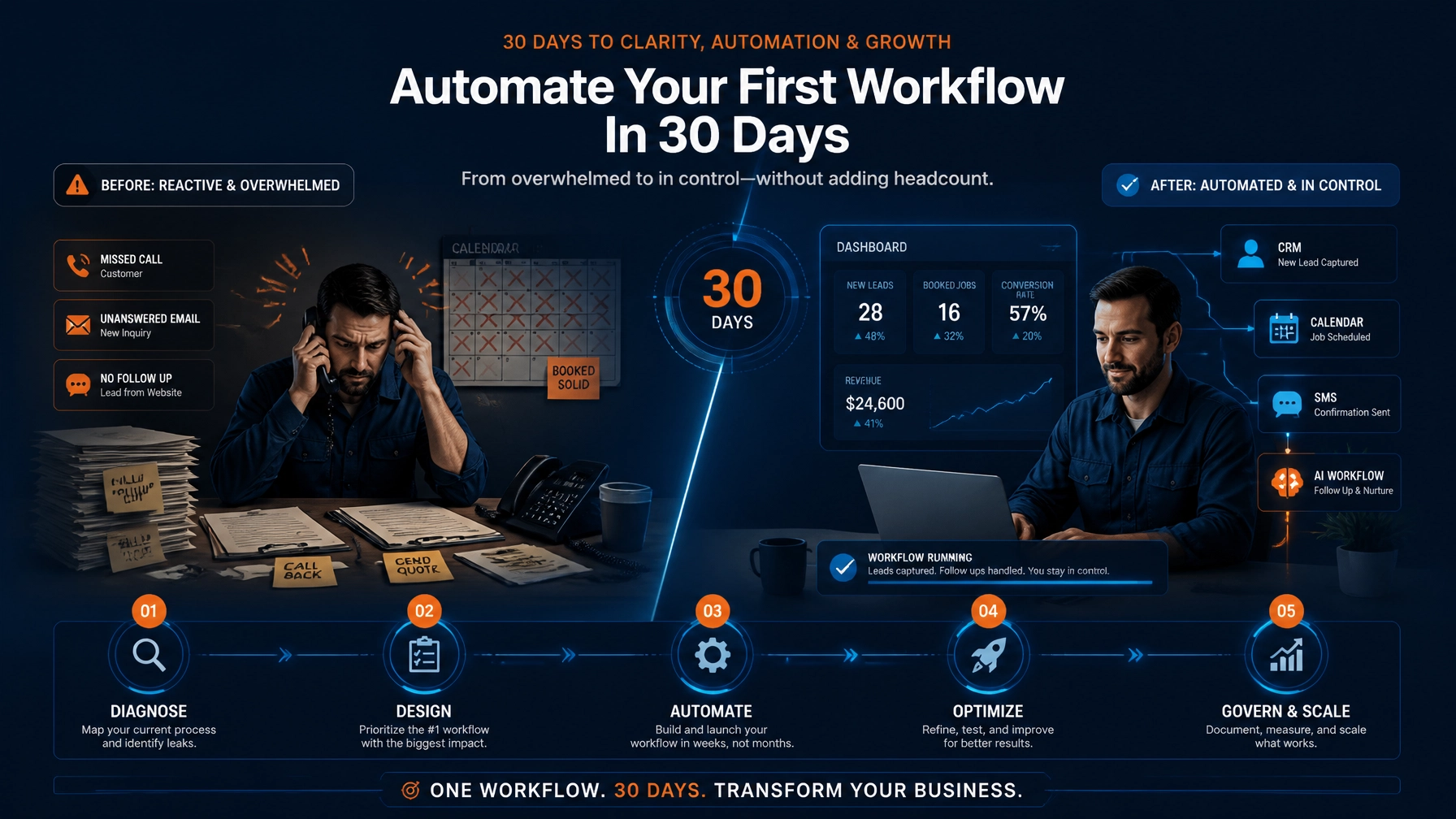
This guide shows you how to move from Diagnose → Architect → Connect → Execute → Govern & Scale.
Start with a diagnostic: not a tool
The most common automation mistake is choosing software before understanding the process.
A new platform will not fix unclear ownership, incomplete information, or inconsistent procedures. Before you connect an AI tool to your inbox or CRM, identify where work is repeatedly delayed, duplicated, or lost.
Look for a workflow that:
- Happens every day or every week
- Follows a recognizable sequence
- Requires people to copy information between systems
- Creates missed opportunities or customer frustration
- Can be measured with a clear before-and-after result
Strong first candidates include:
- Lead intake and follow-up
- Appointment scheduling and reminders
- Estimate-to-job handoff
- Customer review requests
- Invoice and payment follow-up
- Daily service reporting
For many local service businesses, lead follow-up is the best starting point. A simple workflow can capture a new inquiry, identify the requested service and location, draft a response, alert the owner, and log the lead in the appropriate system.
The objective is not to remove human judgment. It is to ensure that routine work happens reliably while your team focuses on customers and revenue-producing activities.

Days 1–3: Diagnose the highest-friction workflow
Choose one workflow. Not three. Not ten.
Start by documenting what happens today. Use a piece of paper, a whiteboard, or a simple spreadsheet. Write down each step from the initial trigger to the final outcome.
For example, a lead follow-up process might look like this:
- A prospect submits a website form.
- Someone checks the inbox.
- The prospect receives a response.
- The team asks for the address and requested service.
- The lead is entered into a CRM or spreadsheet.
- An appointment is scheduled.
- A reminder is sent.
- The owner reviews the opportunity.
Now identify where the process breaks down.
Ask yourself:
- How long does the first response usually take?
- Who owns the next action?
- Which information is frequently missing?
- Where do duplicate records appear?
- Which leads are most likely to be forgotten?
- What happens when the request is urgent or outside your service area?
Capture the exceptions as carefully as the normal process. An emergency request, missing address, unusual service, or unclear message should not be treated like a standard inquiry.
This diagnostic discipline gives you a practical baseline. It also creates the foundation for an AI Readiness Snapshot, a focused way for eligible SMBs to understand where AI and workflow automation may create the most value.
Days 4–7: Architect the future workflow
Once the current process is clear, design the improved version.
Keep the architecture simple. A dependable first workflow usually includes five components:
- Trigger: What starts the workflow?
- Interpretation: What information must be understood or classified?
- Action: What should happen automatically?
- Human review: When must a person approve or intervene?
- Measurement: How will you know the workflow is working?
Here is an example:
When a new website inquiry arrives, capture the contact details, identify the service requested and service area, classify urgency, create or update the customer record, draft a response, and alert the owner if the request is urgent or unclear.
AI is useful for interpreting messages, identifying intent, summarizing information, and drafting responses. Traditional automation is usually better for predictable actions such as creating a record, sending a reminder, or assigning a task.
This distinction matters. You should not send every step through an AI model when a simple rule will do. A more controlled design is often less expensive, easier to troubleshoot, and more reliable.
Your architecture should also define what the automation must never do. For example:
- Do not promise pricing without approval.
- Do not confirm emergency service automatically.
- Do not send a response when required information is missing.
- Do not expose sensitive customer information unnecessarily.
- Do not overwrite an existing customer record without validation.
A tailored process is stronger than a one-size-fits-all template because it reflects your service area, operating hours, customer policies, and risk tolerance.
Days 8–14: Connect your existing tools
You probably already have most of the technology required.
A practical SMB workflow may connect:
- Your website form or email inbox
- CRM or customer database
- Calendar
- SMS or email platform
- Job management system
- Spreadsheet or reporting dashboard
- AI model for classification or drafting
Platforms such as Zapier and Make can connect these systems without requiring an internal development team. The right choice depends on your existing tools, data requirements, and comfort with ongoing administration.
Do not replace everything at once. Connect the systems you already use where possible.
For example:
- Website form → AI classification
- AI classification → CRM record
- CRM record → owner notification
- Approved lead → calendar scheduling link
- Appointment created → customer confirmation and reminder
Before connecting anything, clean up the basic data. Standardize phone numbers, service categories, locations, and customer status labels. If your source information is inconsistent, the automated output will be inconsistent too.
You should also review privacy and security requirements. The NIST AI Risk Management Framework provides a useful reference for thinking about trustworthy AI, risk identification, human oversight, and ongoing evaluation.

Days 15–21: Execute a narrow pilot
Build the smallest useful version first.
If you are automating lead intake, begin with one channel: such as your website form. Do not add phone calls, social media messages, and every advertising platform on day one.
Create test cases that represent real situations:
- An ideal customer inside your service area
- A request for a service you do not provide
- A lead outside your normal coverage area
- An urgent or potentially hazardous request
- A message with an incomplete address
- A vague inquiry with no clear service requested
- A duplicate customer record
Then review the results manually.
Check whether:
- The correct customer record was created or updated
- The lead was routed to the right person
- The AI classification matched your business rules
- The response reflects your brand voice
- Exceptions were escalated properly
- No sensitive or inaccurate information was sent
During the first live phase, keep human oversight in place. You can review every response for the first few days, then move to daily spot checks as confidence improves.
A good automation should always have a pause button and a manual fallback. Control is not a sign that the system failed. It is a core part of responsible implementation.

Days 22–30: Govern, measure, and improve
Automation is not a set-it-and-forget-it project. It is an operating process that needs accountability.
Track a small number of meaningful metrics:
- First-response time
- Number of leads followed up
- Missed or unassigned inquiries
- Appointment conversion rate
- Hours saved each week
- Manual interventions
- Workflow errors
- Completeness of customer records
Compare these results with the baseline you documented during the diagnostic phase.
You should also establish a weekly review. Look for:
- Repeated exceptions
- Incorrect classifications
- Failed integrations
- Customer responses that require editing
- Tasks that still depend unnecessarily on manual entry
- New risks created by the workflow
Update your rules, examples, prompts, and escalation paths based on what you learn. Document the workflow so a team member can understand what it does, what it does not do, and when to take over.
This is where integrity, transparency, and accountability become practical operating principles: not abstract values. Your team should know when AI is involved, how decisions are routed, and who remains responsible for the customer experience.
What a successful first automation looks like
After 30 days, success does not necessarily mean that your business runs without people.
Success may look like:
- Every new inquiry receives a timely acknowledgment
- The owner sees urgent leads immediately
- Customer details are captured consistently
- Staff no longer re-enter the same information
- Appointment reminders happen without manual chasing
- Weekly reporting takes minutes instead of hours
- Your team has more time for service delivery and customer relationships
A focused quick-win build for an SMB may typically fall in the $4,500–$9,500 range, depending on workflow complexity, system integrations, data cleanup, testing, and governance requirements. The value comes from solving one meaningful operational problem properly: not from purchasing the most sophisticated technology.
Once the first workflow is stable, you can decide whether to refine it or apply the same method to a second process.
Your next step: choose the workflow that matters most
Do not begin with the question, “Where can we use AI?”
Begin with:
- Where are we losing time?
- Where are customers waiting?
- Where are tasks being repeated?
- Where is information being lost?
- Where would greater consistency improve performance?
That is your starting point.
A meticulous diagnostic, a tailored architecture, controlled system connections, a narrow pilot, and ongoing governance can transform an overwhelming automation project into a practical 30-day improvement.
You do not need an internal AI team to begin. You need a clear workflow, measurable objectives, and a trusted partner who can help you move from uncertainty to execution.
Explore Back Office Automation, Marketing Automation, or Business Performance Analysis to see how a data-driven approach can help you optimize operations with greater confidence.
Start with one workflow. Make it dependable. Then scale with accountability.