

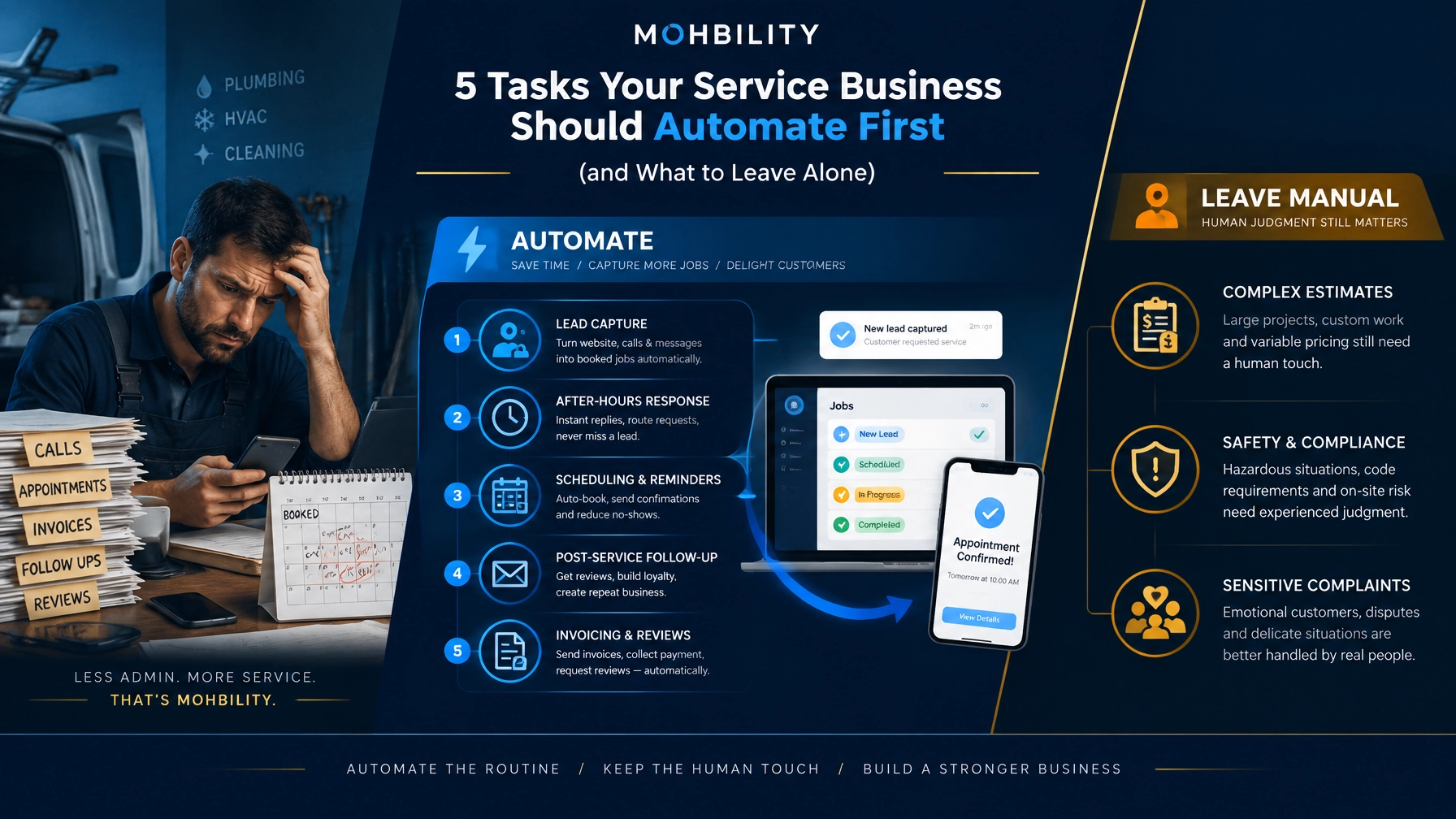
5 Tasks Your Service Business Should Automate First (and What to Leave Alone)
Leading a local service business requires you to balance sales, scheduling, customer service, field operations, billing, and team management at the same time. When every critical task depends on memory and manual follow-through, growth becomes harder to sustain and far more costly than it should be.
Automation can strengthen performance, but a poor starting point can create new risks. An ill-designed workflow can trigger irrelevant messages, create duplicate records, frustrate customers, and strip out the human judgment your business depends on.
Your objective is not to automate everything. Your objective is to identify the repetitive work that slows execution, weakens customer experience, and limits scale, then improve it with precision.
That is the Diagnose-first approach:
- Diagnose where time, revenue, and customer trust are being lost.
- Architect a practical workflow around your actual operations.
- Connect the systems your team already uses.
- Execute one high-value improvement at a time.
- Govern and scale with clear ownership, privacy controls, and performance measures.
For most local service businesses with five to 100 employees, the highest-value first automations sit close to the customer journey. They help you respond faster, reduce administrative burden, and deliver a more consistent, trustworthy experience.
Start with diagnosis, not software
Before you invest in a new platform or deploy an AI assistant, map what happens from the first customer inquiry through the final follow-up.
Ask your team:
- How are new leads captured?
- What happens when a call is missed?
- How long does it take to confirm an appointment?
- Where do customer details live?
- Which invoices require repeated follow-up?
- When do customers receive maintenance reminders?
- Who responds to online reviews?
- Which steps still depend on one person’s memory?
Look for three signals:
- High volume: The task occurs repeatedly each week.
- Clear rules: The next step can be defined without complex judgment.
- Measurable value: Improving the task affects revenue, response time, cash flow, or customer retention.
These signals typically identify the strongest automation candidates.

1. Automate new lead and missed-call response
A missed call is not just a communication issue. It can represent a lost appointment, a lost referral, or a customer who moves to a competitor because your business did not respond quickly enough.
Your first automation should ensure that every inquiry receives a timely acknowledgment.
A practical workflow can:
- Capture inquiries from calls, website forms, email, chat, and text.
- Create a record in your CRM or customer management system.
- Send an immediate confirmation by text or email.
- Ask one useful qualifying question, such as the service needed or preferred appointment day.
- Alert the right team member when a lead needs human attention.
- Create a follow-up task if the prospect does not book.
For example, after a missed call, the customer could receive:
“Thanks for reaching out. We missed your call, but we are here to help. What service do you need, and what day works best for you?”
That message is simple, timely, and credible. It does not pretend that an automated system can resolve every issue.
AI can strengthen this workflow by answering common questions, identifying the type of service requested, and routing the inquiry appropriately. It should not make promises your team cannot keep or project certainty when the situation requires judgment.
Measure the result:
- Response time
- Contact rate
- Booked appointments
- Leads requiring manual intervention
- Revenue generated from previously missed inquiries
2. Automate scheduling and appointment reminders
Scheduling often creates avoidable administrative drag. Staff members exchange multiple messages to find an available time, customers forget appointments, and field teams lose productive hours because the calendar does not reflect operational reality.
A well-designed scheduling workflow can:
- Display approved availability.
- Respect travel time and service-area boundaries.
- Add buffers between appointments.
- Confirm the booking immediately.
- Send reminders 24 hours and a few hours before the appointment.
- Provide clear rescheduling and cancellation options.
- Notify the assigned employee when appointment details change.
The critical word is approved. Do not give an automated scheduler access to every possible time slot without accounting for staffing levels, job duration, travel distance, or equipment requirements.
Start with your most predictable services. A standard maintenance visit may be appropriate for online booking, while a complex commercial installation may require a direct conversation before any time is confirmed.
Use automation to reduce friction, not to force every customer into the same process.
Measure the result:
- No-show rate
- Time spent scheduling
- Rescheduling volume
- Calendar errors
- Average time from inquiry to confirmed appointment
3. Automate post-service follow-up and repeat business
Many businesses invest heavily to win a customer, deliver the service, and then stop communicating. That leaves repeat revenue and long-term loyalty to chance.
Post-service follow-up is one of the most effective areas for automation because the timing and purpose are usually clear.
A practical sequence might include:
- A confirmation that the job has been completed.
- A check-in one to three days later.
- A maintenance reminder based on the service performed.
- A seasonal message when the customer is likely to need help again.
- A re-engagement message after a defined period of inactivity.
For an HVAC company, the sequence might include a post-visit check-in, a filter replacement reminder, and a seasonal maintenance prompt. For a cleaning company, it could include a satisfaction check, a recurring service invitation, and a reminder before a holiday period.
Personalization matters. A message that references the service performed is far more relevant than a generic campaign. Your system can use structured job notes to personalize communication, but your team should define what information is appropriate to use.
Do not automate follow-up before you have reliable customer records. A weak database will produce weak communication.
Measure the result:
- Repeat booking rate
- Maintenance-plan enrollment
- Customer response rate
- Revenue from returning customers
- Unsubscribe and complaint rates
4. Automate invoicing and payment reminders
Cash flow issues often begin with administrative delays. A job is complete, but the invoice goes out late. The invoice is sent, but no one tracks the due date. A staff member remembers to follow up only after weeks have passed.
Connecting job completion to invoicing can make the process faster, more disciplined, and more predictable.
Your workflow could:
- Generate an invoice when a job is marked complete.
- Pull approved service details into the invoice.
- Send the invoice through the customer’s preferred channel.
- Issue a receipt after payment.
- Send polite reminders at defined intervals.
- Notify a team member when an account requires personal attention.
AI may help summarize job notes or flag an unusual invoice for review. It should not change prices, approve discounts, or make collection decisions without clear rules and human oversight.
Build accountability into the process. Someone should own exceptions, disputed charges, overdue accounts, and payment arrangements.
This is also an area where data security is essential. Limit access to financial information, use reputable payment systems, and document who can approve adjustments.
For additional operational guidance, the Ultimate Guide to Back Office Automation for Entrepreneurs explores how small businesses can reduce administrative effort while improving control.
Measure the result:
- Time from job completion to invoice
- Days sales outstanding
- Percentage of invoices paid on time
- Administrative hours spent on payment follow-up
- Number of disputed or corrected invoices
5. Automate review requests and review monitoring
Customer reviews shape trust, local visibility, and the decision to contact your business. Yet many owners request reviews inconsistently, usually when they happen to remember.
A stronger approach is to trigger a review request after a completed job, then stop after one reasonable reminder.
The workflow should:
- Send the request after the customer has had time to experience the service.
- Direct the customer to the correct review page.
- Use clear, honest language.
- Avoid incentives that could compromise review integrity.
- Notify a team member when a serious complaint or low rating appears.
- Keep automated responses separate from sensitive customer issues.
Google’s official guidance on getting more reviews emphasizes genuine customer experiences and prohibits incentives in exchange for reviews. It also recommends responses that are professional, relevant, and conversational.
Automation can help identify patterns across reviews, such as repeated praise for punctuality or recurring concerns about communication. It should not publish defensive or overly generic responses to difficult feedback.
A human should handle:
- Safety concerns
- Allegations of damage or misconduct
- Privacy-sensitive situations
- Threats of legal action
- Reviews that require investigation
Measure the result:
- Review request delivery rate
- Review volume
- Average rating over time
- Response time to negative feedback
- Repeated issues identified through review analysis
What your service business should leave alone
Some tasks may appear repetitive but still require experience, empathy, or accountability. Automating them too early can damage trust and create unnecessary risk.
Be cautious about automating:
- Complex estimates with unusual site conditions
- Safety assessments
- Sensitive complaints
- Refunds and disputed charges
- Hiring and disciplinary decisions
- Exceptions involving vulnerable customers
- Promises about delivery dates or service outcomes
- Technical recommendations outside defined standards
The right model is not “AI replaces the team.” It is automation handles repeatable coordination while your people retain responsibility for judgment.
A practical 30-day starting plan
You do not need a large-scale transformation program to begin. Start with one customer journey and one measurable problem.
Week 1: Diagnose
Document your current process from inquiry to completed service. Identify delays, duplicate entry, missed handoffs, and customer complaints.
Week 2: Architect
Choose one workflow, define the desired outcome, and establish the rules. Decide when automation should act and when it should escalate to a person.
Week 3: Connect
Connect only the systems required for the first use case. Avoid building a complicated technology stack before the workflow is proven.
Week 4: Execute and review
Launch with a small team or service category. Monitor errors, customer reactions, and staff feedback. Refine before expanding.
Your first automation may be as simple as a missed-call text, an appointment reminder, or an invoice trigger. That is enough if it solves a real operational problem.
If you need to move from diagnosis to execution quickly, a Quick-Win Build can help you implement one high-value workflow with the right controls in place.
Build automation around your business, not the other way around
There is no universal automation package for local service businesses. A plumbing company, cleaning company, landscaping firm, and professional services practice may all benefit from faster follow-up, but their workflows, risk profiles, customer expectations, and compliance requirements are different.
That is why a tailored assessment should come before major implementation. The Ultimate Guide to Marketing Automation for Startups also provides useful background on using automation to improve lead generation and customer communication.
If you are unsure where to begin, request an AI Readiness Snapshot. It helps you identify the most practical first use case, the systems involved, and the controls required before you invest in a larger transformation.
If your organization is evaluating broader AI priorities across multiple functions, an Enterprise AI Opportunity Audit can help you assess where automation, analytics, and intelligent workflows will create the strongest business impact.
Start with the task that is repetitive, visible, and valuable. Automate it carefully. Measure the outcome. Then scale with integrity, transparency, and accountability.
Your business does not need more software for its own sake. It needs a clearer operating system that gives your team more time to serve customers well.