
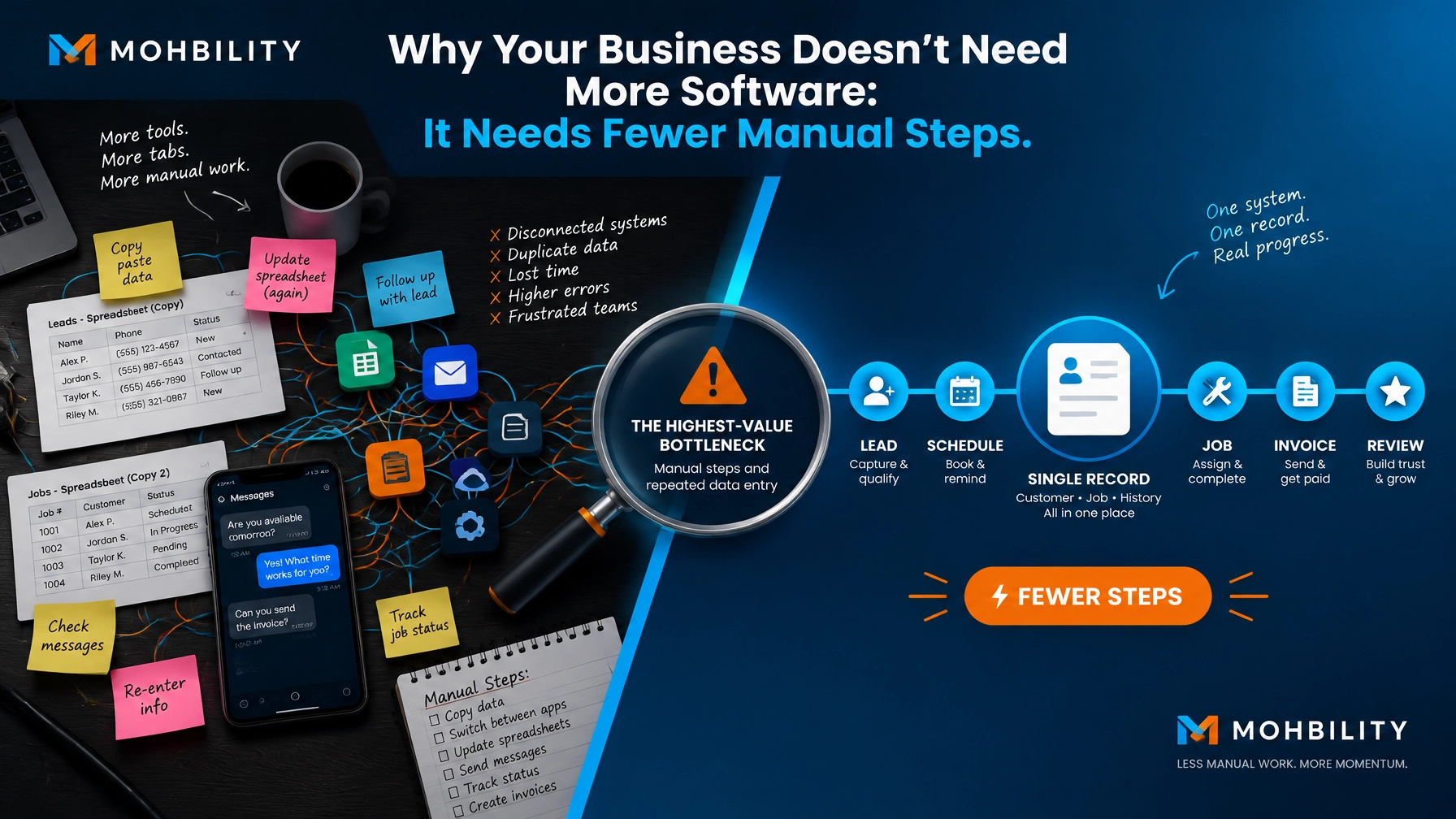
Why Your Business Doesn’t Need More Software: It Needs Fewer Manual Steps
If you run a local service business, you likely do not need another software demonstration.
You need fewer tasks that rely on memory, copying and pasting, repeated phone calls, scattered notes, and employees interpreting the work differently each time.
That distinction is strategic.
New software can create the appearance of progress while leaving the underlying issue untouched. You may add another subscription, another login, and another dashboard, yet still spend your evenings checking whether leads received a response or whether invoices were properly followed up.
The better starting point is diagnosis.
Before you invest in artificial intelligence or automation, examine how work moves through your business. Identify where time is lost, where information is duplicated, and where customers experience unnecessary delays. Then simplify the process before deciding whether a tool deserves a place in the workflow.
The goal is not to own more technology.
The goal is to build a business that operates with fewer manual steps, fewer errors, and greater consistency.
The real cost of manual work is greater than it appears
Manual work rarely presents itself as one obvious expense. More often, it is dispersed across dozens of small actions:
- Re-entering a customer’s information into different systems
- Searching through messages to find the latest request
- Sending the same appointment confirmation repeatedly
- Rebuilding quotes from old documents
- Asking team members for updates
- Checking whether invoices were sent or paid
- Following up with leads who have already been contacted
- Moving information from a phone call into a spreadsheet
- Explaining the same process to each new employee
Each task may only take a few minutes. Collectively, they can consume hours every week.
They also introduce operational risk. A missed follow-up can become a lost customer. A duplicated entry can trigger a billing error. An unclear handoff can delay service delivery. Over time, these small breakdowns erode customer trust, weaken employee morale, and reduce profitability.
Research from Xero on improving business efficiency and GoDaddy’s small business automation guidance points to a consistent principle: businesses should understand and improve their processes before automating them.
That is where many owners make the wrong move. They start searching for a tool before they fully understand the workflow.
More software will not correct an unclear process
Imagine your business receives a new service request.
The customer may call, submit a form, send a message through social media, or contact an employee directly. Someone records the details in one place. Another person transfers the information to a calendar. A third person prepares a quote. The customer may then need to call again for confirmation.
Adding software to this process does not automatically make it efficient.
If the process is unclear, the new tool may simply create another place to enter information. Your team may use it inconsistently. Important details may still sit in email inboxes or text messages. You may end up paying for technology while preserving the same manual habits.
This is why the first question should not be:
Which software should we buy?
The better questions are:
- Where does the process begin?
- What information is needed at each stage?
- Who owns the next action?
- Where is information entered more than once?
- Which steps exist only because the process was never redesigned?
- What does the customer have to wait for?
- Which tasks are repeated often enough to justify automation?
A tool should support a well-understood workflow. It should not be expected to define one for you.

Start with an AI Readiness Snapshot
For a local service business, an AI Readiness Snapshot offers a practical first view of where automation could create meaningful value.
This is not a software sales conversation. It is a structured review of your current operations.
The purpose is to identify the parts of your business that are:
- Repetitive
- Time-consuming
- Relatively predictable
- Prone to avoidable errors
- Important to customer experience
- Suitable for a measured automation pilot
A useful snapshot should assess the full path from customer inquiry to completed service and payment. Depending on your business, that may include:
- Lead intake
- Appointment scheduling
- Customer reminders
- Quote preparation
- Job assignment
- Service updates
- Invoicing
- Payment follow-up
- Review requests
- Customer retention
You do not need to automate every stage. In many cases, the greatest opportunity lies in one narrow bottleneck that affects several parts of the operation.
For example, a home services company may not need an entirely new customer relationship management system. It may need a cleaner way to capture incoming requests, assign the next action, and ensure every inquiry receives a timely response.
Diagnosis helps you recognize that distinction.
Simplify before you standardize
Once you identify a problematic workflow, remove unnecessary steps before introducing automation or moving into a Quick-Win Build.
Start with the following questions:
Can you eliminate a step?
If two employees review the same information, determine whether both reviews are necessary. If a customer must repeat details your business already has, improve the intake process. If a report is created but rarely used, reconsider whether it should exist.
Elimination is often more valuable than acceleration.
Can you combine steps?
A single intake form may replace several phone calls and follow-up messages. A standardized job record may bring customer details, service requirements, scheduling information, and payment status into one place.
Combining steps reduces handoffs and gives your team a clearer view of the work.
Can you create a consistent sequence?
A repeatable process is easier to govern than one that depends on individual preference. Decide what happens after a lead arrives, after a quote is accepted, after a job is completed, and after an invoice is sent.
Your team should not have to guess what comes next.
Can you reduce duplicate entry?
If the same customer information appears in a notebook, a spreadsheet, an inbox, and a scheduling tool, the process is creating unnecessary work. Choose a primary record and define how information moves from one stage to the next.
These changes may sound simple. In practice, they are often where the greatest gains begin.
Then standardize what remains
After removing unnecessary work, document the process in a form your team can actually use.
A practical workflow guide does not need to be a lengthy operations manual. It may be a one-page checklist that explains:
- What triggers the process
- What information must be captured
- Who owns each step
- What communication should be sent
- What happens when an exception occurs
- How completion is confirmed
Standardization creates accountability. It also gives you a reliable foundation for automation.
When each employee handles a customer request differently, it becomes difficult to determine whether a tool is working. When the process is consistent, you can measure changes in response time, completion time, errors, missed appointments, or unpaid invoices.
That baseline is essential.
Choose automation for the right reasons
Once your workflow is simpler and more consistent, you can evaluate technology with greater confidence.
The best early candidates are usually tasks that are frequent, rules-based, and low-risk. Examples include:
- Sending appointment reminders
- Routing new leads
- Creating routine follow-up tasks
- Updating customer records
- Preparing recurring reports
- Sending invoice reminders
- Requesting customer reviews after completed service
- Providing standard answers to common questions
AI can also assist with summarizing inquiries, drafting responses, identifying missing information, or highlighting urgent requests. Human oversight remains important, particularly when a decision involves pricing, safety, privacy, compliance, or a sensitive customer situation.
The objective is not to remove judgment from your business. It is to preserve human attention for the work that genuinely requires judgment.
Measure whether the change is working
A successful automation initiative should produce a visible operational benefit.
Before launching a pilot, establish a simple baseline:
- Hours spent on the task each week
- Average customer response time
- Number of missed follow-ups
- Appointment no-show rate
- Invoice collection time
- Number of manual data entries
- Customer complaints connected to delays or confusion
Then test one workflow for a defined period. Compare the results with the baseline and ask your team what improved and what created friction.
Do not expand simply because a tool has impressive features. Expand when the process is clearer, the team is using it consistently, and the results justify the investment.
This measured approach protects your budget and builds confidence across the business.
A trusted partner starts with the problem, not the product
Your business is not the same as another local service company. Your staffing model, customer expectations, systems, and growth plans are different.
That is why a one-size-fits-all technology recommendation is rarely appropriate.
A tailored approach begins with your operating reality. It considers your current tools, your team’s capacity, your customer journey, and the risks associated with change. It also recognizes that transformation should be practical, not disruptive for its own sake.
The right partner will help you:
- Diagnose the source of operational friction
- Prioritize the highest-value opportunity
- Simplify the workflow before selecting tools
- Protect customer data and business information
- Establish clear measures of success
- Implement changes in manageable stages
- Provide support after the initial rollout
At every stage, integrity, transparency, and accountability should guide the work.
For larger organizations, this same principle applies through an Enterprise AI Opportunity Audit, which examines broader opportunities across departments, systems, governance, and risk. For local service businesses, the starting point is more focused: understand where manual work is constraining performance, then determine what should change first.
Fewer steps create room to grow
You do not need to transform your entire business in one move.
Start with one workflow. Find the friction. Remove what does not add value. Standardize what remains. Then introduce technology where it can produce a clear and measurable improvement.
This approach can help you:
- Respond to customers faster
- Reduce avoidable errors
- Improve staff productivity
- Protect valuable management time
- Deliver a more consistent customer experience
- Increase the return on tools you already own
- Grow without adding unnecessary administrative burden
The most effective technology strategy is often less about adding capabilities and more about removing complexity.
Your next investment may not be another platform. It may be a clearer process.
Start with diagnosis. Simplify the work. Then automate what is ready.
For additional guidance on data-driven transformation and technology strategy, explore the technology resources and business performance analysis guide.